
An employer’s Privacy Act 2020 obligations
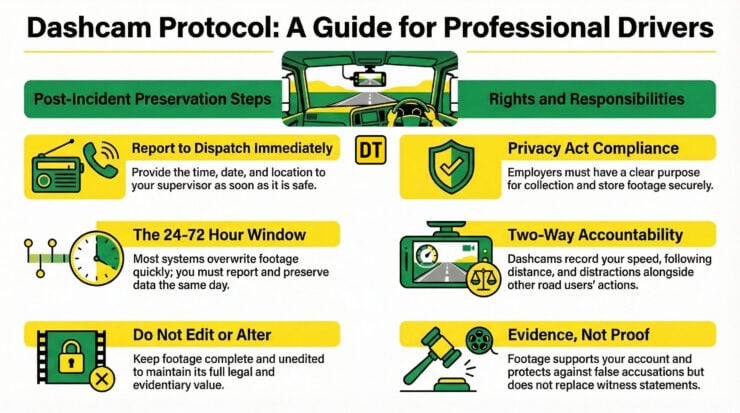
Dashcam footage is personal information under the Privacy Act 2020. Your employer (as PCBU) must:
- Have a clear purpose for collecting dashcam footage (e.g., fleet safety, incident investigation, insurance claims)
- Tell drivers that dashcams are installed and how footage will be used
- Store footage securely with appropriate access controls
- Retain footage only as long as necessary (typically 30-90 days unless flagged for investigation)
- Respond to access requests from individuals who appear in footage.
Key point: Dashcam systems must be set up and managed by your employer, not installed ad hoc by individual drivers.
Preserving footage after an incident
Most dashcams automatically overwrite old footage. If something happens, you need to preserve it immediately.
STEP 1: Report to your supervisor/dispatch
- As soon as it’s safe to do so
- State that dashcam footage needs to be preserved
- Provide: time, date, location, approximate duration
STEP 2: Follow your company procedure
Common methods include:
- Flagging the file on the dashcam system (if your system allows)
- Downloading to SD card or USB (if instructed)
- Emailing/messaging details to fleet management
- Completing an incident report form that triggers footage review
STEP 3: Don’t edit, delete, or alter
- Keep footage complete and unedited
- Don’t trim out “irrelevant” parts
- Don’t add commentary or text overlays
- Full, unaltered footage has evidential value
Timeline matters: Most dashcams overwrite footage within 24-72 hours. Report and preserve the same day.
What dashcams can do as evidence
Dashcams are extremely useful when incidents occur and it’s a he-said/she-said scenario. Whether the driver is the victim of road rage, or inadvertently involved in a crash of someone else’s doing, a camera could clear up arguments. Of course, training on how to respond to road rage would be important in some scenarios.
✓ Dashcams CAN:
- Provide timestamps and GPS data showing when and where an incident occurred
- Show the sequence of events leading up to an incident
- Corroborate your account of what happened
- Protect you from false accusations if you weren’t at fault
- Be used by Police as evidence in traffic prosecutions
- Support insurance claims by showing the circumstances of a collision
- Document aggressive behaviour from other road users (tailgating, brake-checking, threats)
✗ Dashcams CANNOT:
- Guarantee your version is believed – footage is open to interpretation
- Capture everything – blind spots, lighting conditions, and camera angle limitations mean some details may not be visible
- Replace witness statements – human observations still matter
- Show what happened before you started driving (if camera only records while vehicle is running)
- Record audio reliably – many dashcams have poor audio quality; don’t rely on audio alone
Dashcams record your behaviour, too
Critical reminder: If there’s an incident and footage is reviewed (by your employer, Police, or in court), your driving will be scrutinised.
The dashcam will show:
- Your speed
- Your following distance
- Whether you indicated
- Whether you were distracted
- Your reaction times
- Any aggressive manoeuvres you made
Dashcams are not just for catching other people. They’re a reason to drive well, every time.
Submitting footage to Police
If you’re reporting a road rage incident or traffic offence:
- Report to Police (111 for emergencies, 105 for after-the-fact)
- Tell them you have dashcam footage and would like to submit it
- Follow their instructions – they may:
- Provide a file reference number for you to upload footage online
- Request you email a copy (they’ll provide an address)
- Ask you to bring the SD card to a Police station
- Include key details:
- Your name and contact information
- File reference number (if you were given one)
- Date, time, and location of the incident
- Brief description of what the footage shows
Don’t post it on social media first. Submitting footage to Police for evidence and posting it publicly are different things. If you want it taken seriously as evidence, submit it formally first.
Summary
✓ Report incidents immediately to preserve footage before it’s overwritten
✓ Don’t edit or alter footage — keep it complete and unaltered
✓ Follow your company’s procedure for flagging and preserving footage
✓ Remember dashcams record you too — drive professionally at all times
✓ Submit footage properly to Police if you’re reporting an incident
✓ Dashcams are evidence, not proof — they support your account but don’t replace it
Questions about your company’s dashcam policy?
Ask your supervisor or fleet manager.
Questions about submitting footage to Police?
Call 105 (non-emergency) for guidance.


Darren has written over 3000 articles about driving and vehicles, plus almost 500 vehicle reviews and numerous driving courses. Connect with him on LinkedIn by clicking the name above